
Mobile Pre-Sales Software for FMCG, CPG, and Distribution Companies
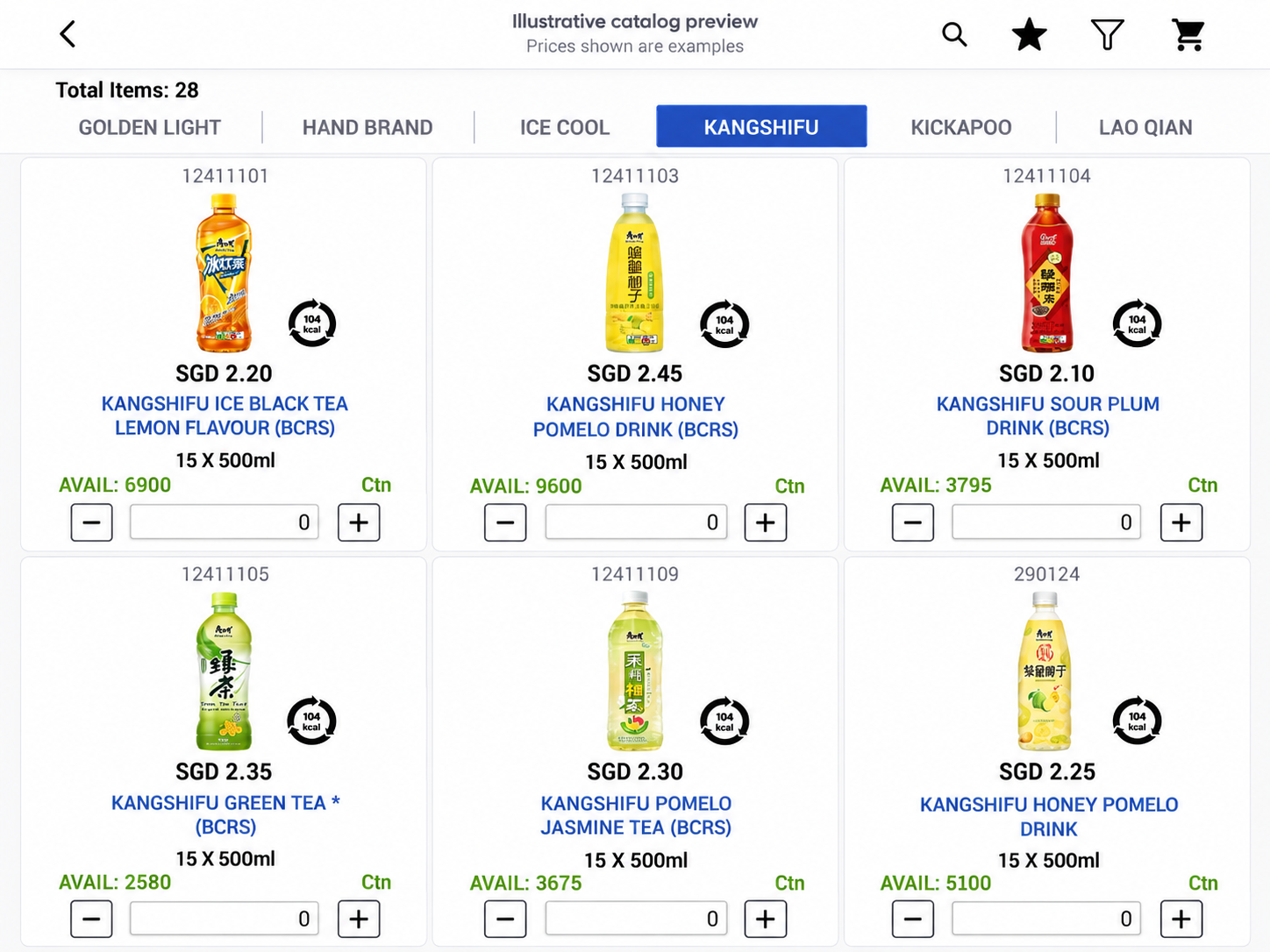
Captivate your customers with an impressive e-Catalog. ONTHEGO Mobile Pre-Sales helps your sales team present your finest products with stunning visuals, then manage customer orders from the field.
Supercharge your sales on the go with a mobile product catalogue built to make product discovery clear and engaging for your customers.
Supercharge Your Sales on the Go
e-Catalog
Provide the best experience to your customers by presenting the most stunning visuals of your finest products.
Our Core Features
Product presentation
- e-Catalog
- Unlimited product categories
- Upsell features
- Memorized items
Sales tools
- e-Signature
- Intensive price history
- Comprehensive selling price structure
- Real-time information
Field-ready access
- Supports online and offline use
- Data synchronisation via 4G and Wi-Fi
Sales Order Approval
Review your sales orders before approval
Give managers a clear approval step for customer credit, free-of-charge (FOC) items, and edited prices. Review the order details and key checks together, then approve or request changes with an optional comment.
Protect credit control. Surface credit considerations at review time so teams can make an informed decision before committing the order.
Keep promotions intentional. Check FOC lines and quantities in context to catch unintended giveaways and help keep promotional costs on plan.
Guard pricing and margin. Make price edits visible for review, helping approvers confirm the intended selling price and reduce avoidable pricing errors.
Move decisions along. Bring order lines, review flags, and the decision action into one focused view, reducing back-and-forth and helping sales teams get a timely response.
Review key checks before approving an order.
Check credit
Review account exposure.
Check quantities
Confirm free items.
Verify changes
Check revised prices.
Mobile Pre-Sales Software Frequently Asked Questions
1. Can Mobile Pre-Sales handle more than 15,000 products?
Yes. The e-Catalog can support more than 15,000 SKUs, making it suitable for broad household hardware distribution ranges. Organised categories and product search help sales reps find items quickly, while product visuals make it easier to present the right options to customers.
2. How does sales order approval help reduce bad-debt risk?
Orders can be routed for review when customer credit needs attention, giving managers an opportunity to check account exposure before an order proceeds. This helps teams apply credit policies consistently, flag potential risks earlier, and make better-informed decisions. Approval workflows support credit control; they do not guarantee that bad debt will be eliminated.
3. Can managers review FOC items and edited prices?
Yes. The approval process can bring customer credit, free-of-charge (FOC) items, and price changes into the order review. Approvers can check quantities and revised prices, then approve or request changes to help prevent unintended giveaways and pricing errors.
4. What can customers see in the e-Catalog?
Sales reps can present products with clear images and organised categories, then review relevant product information such as selling prices and availability. A consistent catalogue helps customers compare options and supports confident product selection during a sales visit.
5. How does the e-Catalog help reps find products in a large range?
Products can be grouped into categories so reps can browse a broad assortment without relying on printed catalogues or memory. Upsell and memorised-item features can also help reps surface related products and frequently ordered items, making each customer conversation more productive.
6. Can reps use Mobile Pre-Sales when internet access is limited?
Mobile Pre-Sales supports online and offline use. Data can synchronise over 4G or Wi-Fi when a connection is available, helping field teams continue their work across different coverage conditions.
7. Does Mobile Pre-Sales help reduce order-entry mistakes?
Reps can prepare orders from the product catalogue using current product and selling information available to them. The approval step also makes selected credit, FOC, and price-edit checks visible to managers before orders proceed, helping teams catch issues earlier and reduce follow-up corrections.
8. What are the main benefits for a household hardware distributor?
A large, categorised e-Catalog makes an extensive hardware range easier to present and browse. Field order capture, product discovery tools, online and offline access, and sales order approval can help teams serve customers faster, maintain more consistent order checks, and reduce paper-based work.
More Mobile Pre-Sales Features
9. Can reps check warehouse inventory in real time?
Yes. Reps can check the latest warehouse inventory information available in the app while discussing an order with a customer. This helps them confirm likely availability before placing an order, set clearer expectations, and avoid unnecessary follow-up. Inventory accuracy depends on timely updates from the connected system.
10. Can reps see a customer’s outstanding balance during a visit?
Yes. Customer outstanding balance information can be available to reps in the field, helping them have informed payment and credit conversations before taking a new order. With relevant account context at hand, teams can follow credit policies more consistently and escalate concerns for review when needed.
11. Does the app support multiple units of measure (UOM)?
Yes. Multi-UOM support lets businesses manage and sell products using the units that fit their operations, such as pieces, packs, or cartons. This makes ordering more practical for customers, helps reduce unit conversion mistakes, and supports clearer order quantities across different packaging formats.
12. Can managers track customer visits with check-in and check-out?
Yes. Reps can check in when they arrive at a customer and check out when the visit is complete. This gives managers a clearer view of field activity and visit completion, helps teams plan and follow up more effectively, and provides a more consistent record of customer coverage.